Your workspace subscription pays for the platform services your business uses. It is separate from the internet packages you sell to subscribers. Understand these two billing layers before interpreting an invoice or deciding whether a customer package change should alter the workspace plan.
Before you start
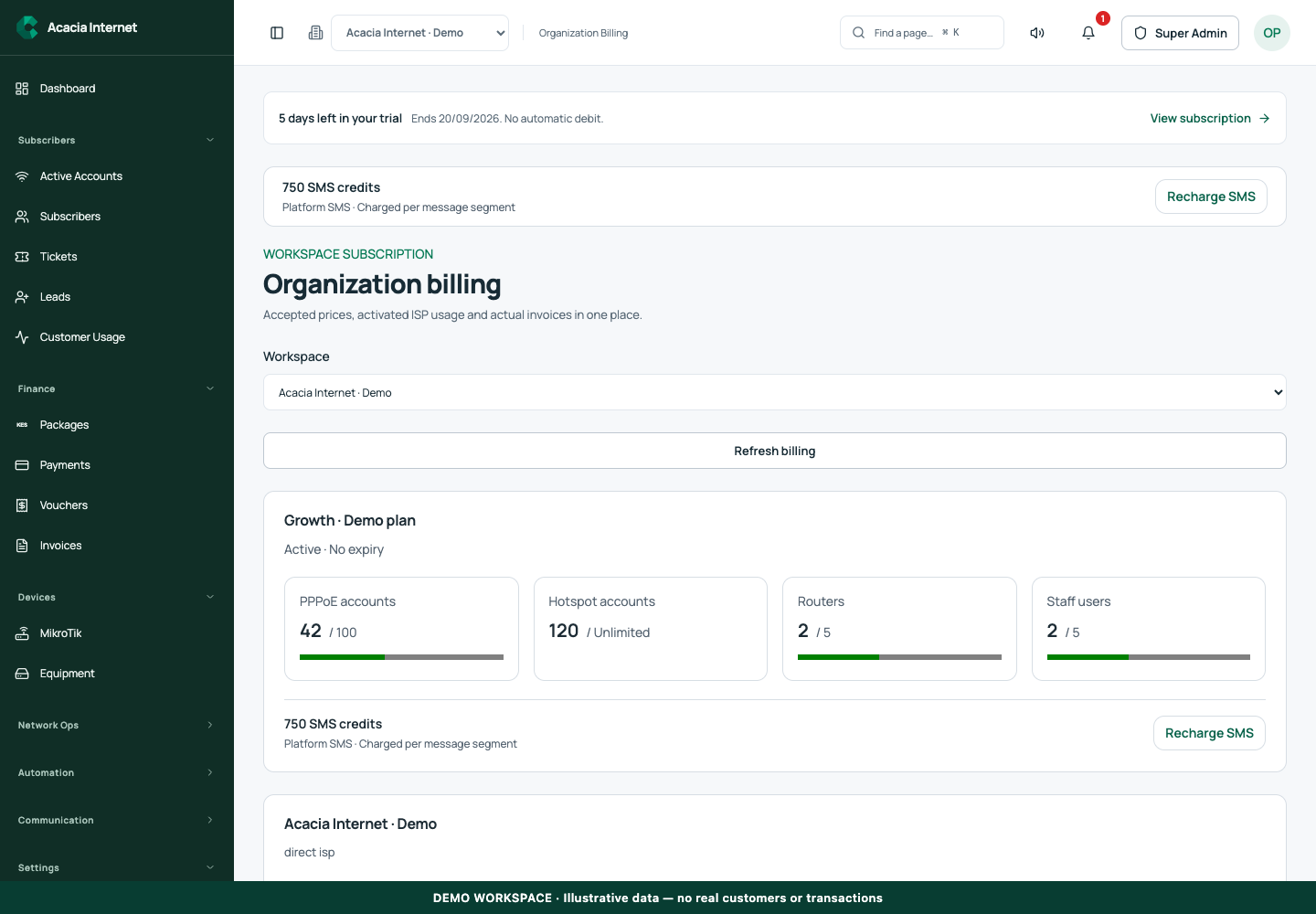
Open /organization-billing in the workspace you intend to manage. The workspace name determines which routers, subscribers and records you can see. These screenshots use Acacia Internet, a fictional training workspace. Names, phone numbers, addresses, account counts and money shown are demonstration data; do not copy them into a live customer record. Your available controls depend on your role, plan and configured integrations.
1. Open the organization billing view
Use Settings → Subscription & retail fees or the View subscription link in the trial notice. Confirm the workspace name and plan status. The relevant organization billing view should show the current subscription context rather than a historic demonstration price. If you manage several organizations, inspect each separately; one workspace’s allowance does not automatically cover every client organization.
2. Read plan allowances by resource type
Review PPPoE accounts, Hotspot accounts, routers and staff users separately. A plan may allow a fixed PPPoE count and unlimited Hotspot accounts, but unlimited accounts is not a promise of unlimited hardware throughput or free message delivery. Compare the displayed used and allowed values. In the demonstration, 42 of 100 PPPoE accounts, 120 unlimited Hotspot accounts and 2 of 5 routers are illustrative usage figures, not a currently advertised plan. Router and staff limits can be reached before the subscriber allowance is exhausted.
3. Check trial dates and subscription expiry
Read the trial start, end and remaining time when the workspace is in a trial. An active non-expiring administrative entitlement can differ from an ordinary paid plan, so use the actual status shown for the selected workspace. Record the next billing responsibility for your team. Do not assume a saved payment provider means the subscription will automatically renew without the displayed authorization and billing rules.
4. Review included and purchased SMS separately
Included plan credits and purchased credits contribute to the applicable SMS wallet according to the configured entitlement process. Inspect the current balance and credit history instead of assuming a number in a plan description has already been granted. If the workspace uses its own SMS gateway, the provider’s balance is separate from unused platform credits. Check the selected mode before topping up.
5. Act on near-limit warnings early
Usage warnings help you notice when account, router or staff consumption is approaching the allowance. Review which resource is growing and whether the records are legitimate. Remove or disable obsolete operational records only through their supported retention workflows. Do not delete customer financial history to make a usage number smaller. Plan an upgrade before onboarding a large new site.
6. Complete a plan change and verify the result
Use the available subscription purchase or change action, read the current price and terms and finish the supported payment process. Verify the final subscription status, allowances and any credit grant after confirmation. A payment request or pending invoice does not mean the new plan is active. Retain the invoice and payment reference for your business accounts.
Confirm the result
You should be able to state the current plan, billing or expiry date, resource allowances and SMS balance source. Check those values after a plan change and before a major customer acquisition campaign. Keep subscriber package revenue and workspace subscription expenses separate in financial reporting.
Questions and troubleshooting
Does unlimited Hotspot mean unlimited everything? No. Router capacity, traffic, messages and other plan resources still matter. Why did included credits not appear? Inspect the entitlement grant and wallet record rather than purchasing duplicate credits immediately. Can I use the owner’s permanent entitlement for every tenant? No; permissions and subscriptions are scoped to the relevant organization. Why are retail fees shown for a reseller? Retail customer billing and the reseller’s own platform bill are separate layers.
Continue with the next task
Next read dashboard reporting and SMS wallet management.
This guide describes the application reviewed on 15 September 2026. If a screen displays a warning, follow that specific message before continuing. For support, include the workspace, affected record, time of the attempt and the operation reference where available. Never include passwords, router command tokens, payment secrets or verification codes in a public support message.