Campaigns are useful for planned notices and relevant offers, but audience selection matters as much as the message. A service interruption notice for one building should not automatically reach every subscriber. Prepare the audience, channel and content together before committing a send.
Before you start
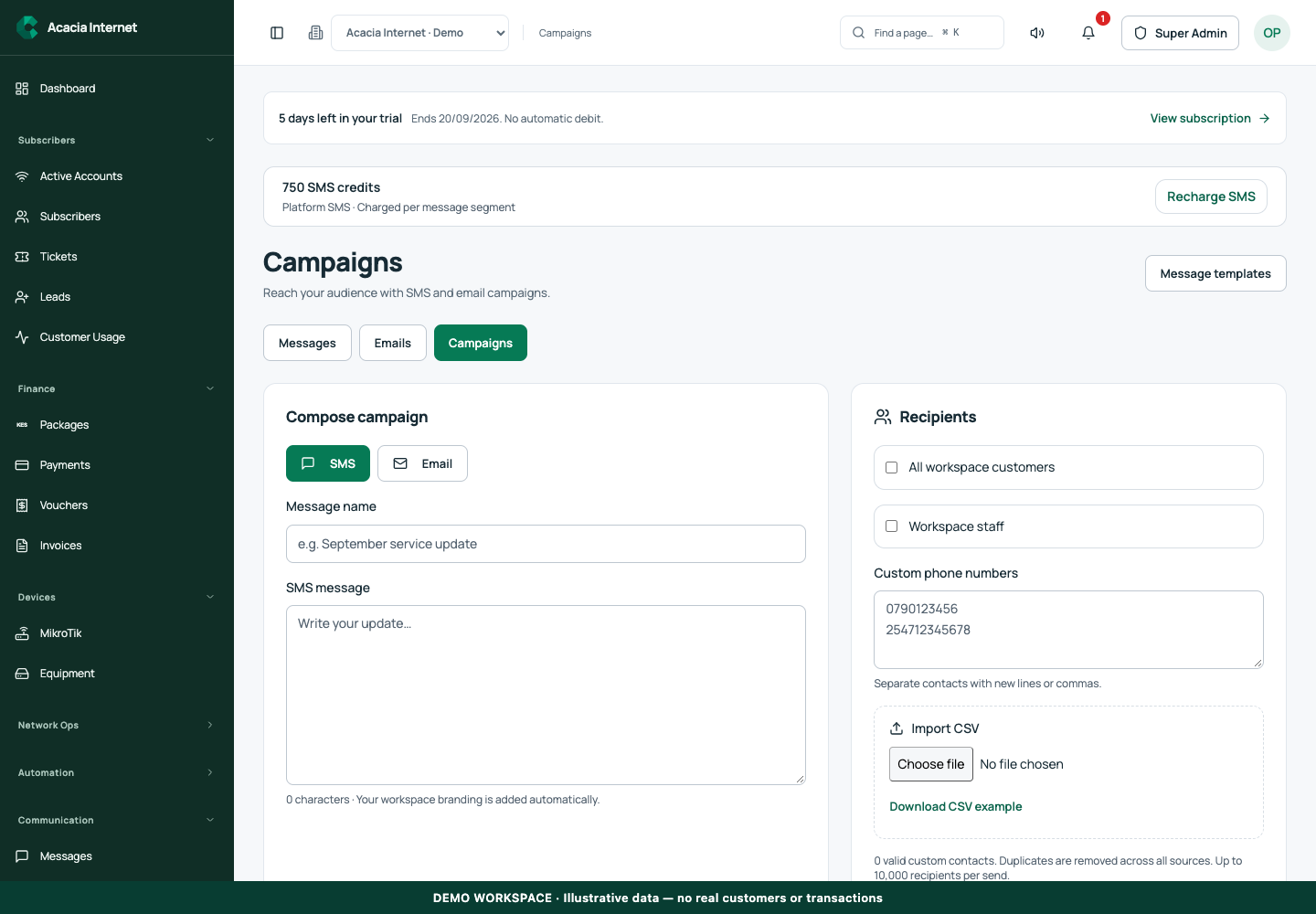
Open /campaigns in the workspace you intend to manage. The workspace name determines which routers, subscribers and records you can see. These screenshots use Acacia Internet, a fictional training workspace. Names, phone numbers, addresses, account counts and money shown are demonstration data; do not copy them into a live customer record. Your available controls depend on your role, plan and configured integrations.
1. Choose the communication purpose and channel
Decide whether the message is a service notice, account communication or optional promotion. Use SMS for concise information that needs a phone notification, and email for longer instructions or linked details. Open Messages, Emails or Campaigns as appropriate. Keep a specific internal title so your team can identify the send later without reading every recipient record.
2. Build an audience from supported sources
The recipient controls support workspace customers, staff, manually entered contacts and CSV imports. Select only the sources relevant to this communication. An all-customer audience can include people at different sites or stages of service, so review its scope carefully. Do not treat possession of a contact list as permission to send unrelated promotional messages.
3. Prepare a clean import file
Download the CSV example from the interface and preserve its expected headings. Include the required phone or email values and remove unrelated sensitive columns. Validate the imported count before proceeding. Duplicate removal helps prevent repeated messages to the same normalized address, but it does not correct a phone number or mailbox belonging to the wrong person.
4. Write content that stands on its own
For a service notice, state what is happening, who is affected, the relevant time and the next action. For email, use a clear subject and a meaningful link label. Keep payment instructions consistent with your configured portal. Avoid urgency that could make a legitimate message resemble a phishing attempt, and never ask customers to reply with passwords, OTPs or mobile-money PINs.
5. Review branding, channel readiness and cost
Check the preview, sender name, support details and destination links. Email requires a ready sender; SMS requires a selected gateway and sufficient balance for the segments. A white-label workspace must use its permitted brand and sender configuration. If the system reports a missing integration, fix it before sending rather than substituting a different organization’s identity.
6. Submit once and review recipient outcomes
Use the supported send or schedule control, then inspect the resulting job and recipient statuses. A campaign can partially succeed, so review failures individually. Keep a pending or uncertain request linked to its original record. Do not resend the full audience because a small subset failed; that can duplicate messages to customers who already received the first attempt.
Confirm the result
Your final record should show the message, audience scope, selected channel, submission time and available outcomes. Compare SMS cost with actual segments, and interpret email acceptance separately from inbox delivery or reading. For future campaigns, use the recorded results to clean invalid contacts and improve clarity rather than inventing engagement statistics.
Questions and troubleshooting
Can I mix staff and customer audiences? Yes where the selector permits it, but review whether the content is appropriate for both. Does an email accepted status mean it was read? No. Why did some contacts disappear from the final count? Validation and duplicate removal can change the audience; inspect the import feedback. Can I use CSV imports for a purchased list? Use only contacts you are entitled to communicate with and honour their preferences.
Continue with the next task
Next read SMS credits and messages and email sender setup.
This guide describes the application reviewed on 15 September 2026. If a screen displays a warning, follow that specific message before continuing. For support, include the workspace, affected record, time of the attempt and the operation reference where available. Never include passwords, router command tokens, payment secrets or verification codes in a public support message.