Kenya ISP operations
ISP Billing Software in Kenya | MikroTik, M-Pesa & PPPoE
ISP billing software in Kenya should connect three things that operators often manage separately: who has paid, which internet service they purchased, and what the router is actually allowing. Centranet brings subscriber administration, MikroTik operations, payment records and branded customer experiences into one workspace. This guide explains how to plan your setup, launch a small network and build a repeatable operating process as your customer base grows.

01
What an ISP billing system should do
A payment spreadsheet can tell you that money arrived, but it cannot reliably show which router serves a customer or whether their connection was restored. A useful billing platform keeps the subscriber, package, payment reference, service period and router assignment together. That relationship is the foundation of accurate renewals and helpful support.
Start by mapping your business. A residential fibre operator may mainly need monthly PPPoE renewals. A public Wi-Fi operator may sell short Hotspot packages. A mixed network needs both without confusing a temporary Wi-Fi guest with a contracted home subscriber. Keep your operating records organized by service type and site.
- Subscriber accounts with clear service and router assignments
- Packages with price, speed, duration and supported customer type
- Confirmed payments linked to a ledger and subscription
- A customer portal and a reachable support channel
02
Prepare your workspace before touching the router
Create your operator account, verify your email and complete the business workspace step. Use a business name customers recognize, a working support email and an owner phone number. Check the inbox and spam folder for verification. Resolve an incomplete workspace before asking a technician to start router enrollment.
Then choose the country and currency appropriate to the operation, review the subscription and allocate staff permissions. The owner should retain control of payment settings and branding. A technician can work on assigned network operations without using the owner’s credentials. Record which staff member is responsible for each site and its customer support.
03
Onboard MikroTik with a clean, reviewed setup
Centranet onboarding requires RouterOS 7.20 or later, internet access and a clean hard-reset device without previous configurations for the clean setup approach. Back up an existing production router before any reset. A reset interrupts services, so test on a spare unit or schedule a planned maintenance window for a live site.
Add the router in the workspace and follow the generated enrollment instructions. Review the internet interface, protected management paths and customer interfaces before applying configuration. Keep the setup window open while verified steps run. A connected heartbeat shows the agent can report; completed setup and service tests establish that the customer network is working.
- Confirm the correct workspace and router identity
- Select only intended customer ports or networks
- Wait for setup verification rather than repeating commands
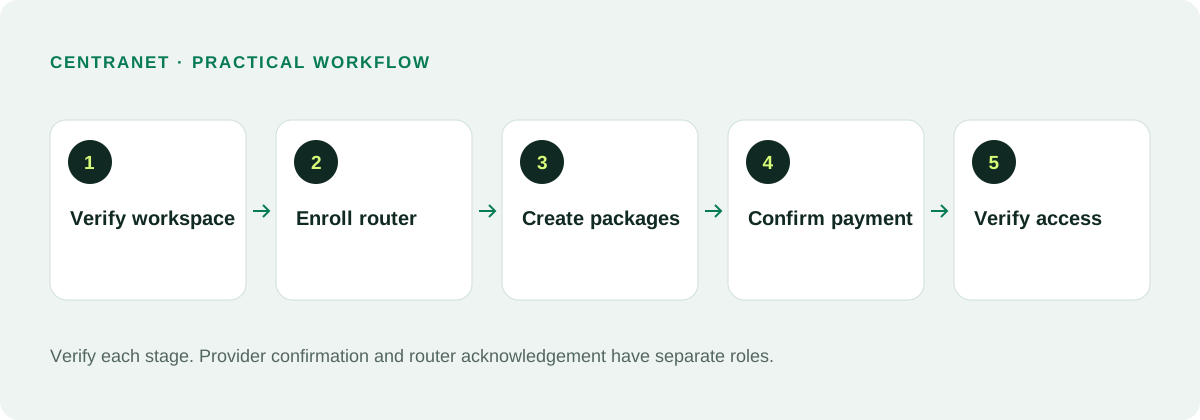
- Test a real Hotspot purchase and a PPPoE renewal before launch
04
Create packages that match what customers buy
Give packages clear names such as Home 10 Mbps or Wi-Fi 2 Hours. Record download and upload speeds separately, choose the service type and set the duration. Short Hotspot durations can use minutes or hours; PPPoE offers commonly use longer subscription periods. Assign the relevant routers so a package appears at the intended site.
Do not use a marketing label as a substitute for a service definition. A two-hour offer needs a precise validity rule; a monthly offer needs a renewal period and a paid-through date. If different sites have different upstream capacity, use site-appropriate packages and test the router profile after synchronizing it.
05
Collect M-Pesa payments and match renewals
For Kenya, a familiar M-Pesa payment path makes it easier for subscribers to renew. An STK checkout asks for a phone number and sends a payment prompt through the configured provider. A manual Paybill payment requires the correct Paybill and a unique subscriber account reference. Publish only the instructions supported by that workspace’s active collection route.
Payment confirmation must come from the provider’s verified callback or reconciliation result. A screenshot, a customer saying paid, or a browser success screen is not enough to credit a subscription. Once a confirmed payment is allocated, Centranet can update the entitlement and request the corresponding router service change. Check the router result if access does not return.
06
Give PPPoE subscribers a simple renewal journey
Register each fixed subscriber with accurate contact details, the intended router, a package and a unique account reference. Give them their portal link and account instructions. A readable reference is useful only if it is unique and recognized by the actual payment route. Test one registration and its welcome delivery before onboarding a large batch.
Some customers will never open a portal. For those subscribers, clear renewal reminders with their account reference and payment instructions are particularly valuable. Others can use their portal to review service information and pay through the available checkout. In both cases the operator should be able to find the payment and explain the resulting service period.
07
Make Hotspot checkout quick and understandable
A Hotspot guest should see available packages, choose one, enter a payment number and pay. Avoid forcing an email address into a short Wi-Fi purchase. Show a retry action for a failed or timed-out attempt while keeping a confirmed payment from being charged again. The customer should know whether the system is waiting for payment or activating access.
Test the portal from an unauthenticated phone connected to the actual Wi-Fi. Its domain, checkout dependencies and required endpoints must be reachable before internet authorization. Repeat the test after expiry. Captive portal behavior depends on the phone and router, so include Android, iPhone and a laptop in your launch checks.
08
Understand subscription costs and messaging credits
The published Flex base is KES 500 per month plus usage, with 30 active PPPoE accounts, two routers and unlimited Hotspot accounts in the included model. Current catalog rates list KES 20 for an additional active PPPoE account and KES 100 for an additional router per month. For new contracts, 3% of total recorded subscriber collections applies once monthly collections reach KES 7,000. Optional Flex white label and custom domain is KES 200 per month. Confirm the live pricing page and checkout for current terms.
The included 100 SMS credits are a messaging allowance, not unlimited texting. Long or Unicode messages can consume multiple segments. Track the workspace balance and recharge before renewal reminders are due. Payment processing, revenue-share charges and provider fees are separate from the base subscription; budget for the entire operating cost.
09
Run a daily operating routine
Begin with outstanding payments, customers nearing expiry and router availability. Investigate a payment against its provider reference before asking a customer to pay again. For a paid but disconnected subscriber, check their assignment, package, router heartbeat and service-change acknowledgement. Keep notes so the next staff member does not repeat the same investigation.
Use a consistent date range when comparing collections, subscription revenue and payouts. Gross customer receipts are different from the net balance available for disbursement. Separate a failed collection, a pending service activation and a delayed payout in your support process. This makes accounting easier and prevents misleading dashboard conclusions.
10
Launch with evidence, then grow carefully
A sensible first launch uses one router, one test PPPoE account and one short Hotspot package. Complete registration, payment, activation, renewal, expiry and support tests. Record the expected result at each step. Expand to a second site only after the same process can be repeated without relying on one person’s memory.
As your network grows, group routers and customers by site, protect administrative access, keep recoverable backups and review provider limits. Cloud software simplifies operations, but it does not remove the need for reliable power, upstream capacity or device maintenance. Build a service your team can explain and support, not just a checkout customers can click.
Related documentation and next steps
Use current product information and original provider documentation when planning your deployment.
Good questions. Clear answers.
Let’s clear
a few things up.
A little clarity goes a long way.
Ask us something elseCan I run PPPoE and Hotspot in one workspace?
Yes. Keep service types, packages and router assignments clear, and verify both customer journeys on the actual network.
Does a confirmed payment guarantee immediate internet?
Activation follows confirmed payment, but it also depends on an online router, correct configuration and the customer device. Check service acknowledgement when a paid customer remains offline.
Do I need my own payment credentials?
Where platform-managed collection is available you can use that route with the required payout setup. You can otherwise connect your own supported merchant gateway.